Task Mode: Dynamic Filtering for Task-Specific Web Navigation using LLMs
University of Texas at Austin
ASSETS 2025
Abstract
Modern web interfaces are unnecessarily complex to use as they overwhelm users with excessive text and visuals unrelated to their current goals. This problem particularly impacts screen reader users (SRUs), who navigate content sequentially and may spend minutes traversing irrelevant elements before reaching desired information compared to vision users (VUs) who visually skim in seconds. We present Task Mode, a system that dynamically filters web content based on user-specified goals using large language models to identify and prioritize relevant elements while minimizing distractions. Our approach preserves page structure while offering multiple viewing modes tailored to different access needs. Our user study with 12 participants (6 VUs, 6 SRUs) demonstrates that our approach reduced task completion time for SRUs while maintaining performance for VUs, decreasing the completion time gap between groups from 2x to 1.2x. 11 of 12 participants wanted to use Task Mode in the future, reporting that Task Mode supported completing tasks with less effort and fewer distractions. This work demonstrates how designing new interactions simultaneously for visual and non-visual access can reduce rather than reinforce accessibility disparities in future technology created by human-computer interaction researchers and practitioners.
Types of Webpage Distractions
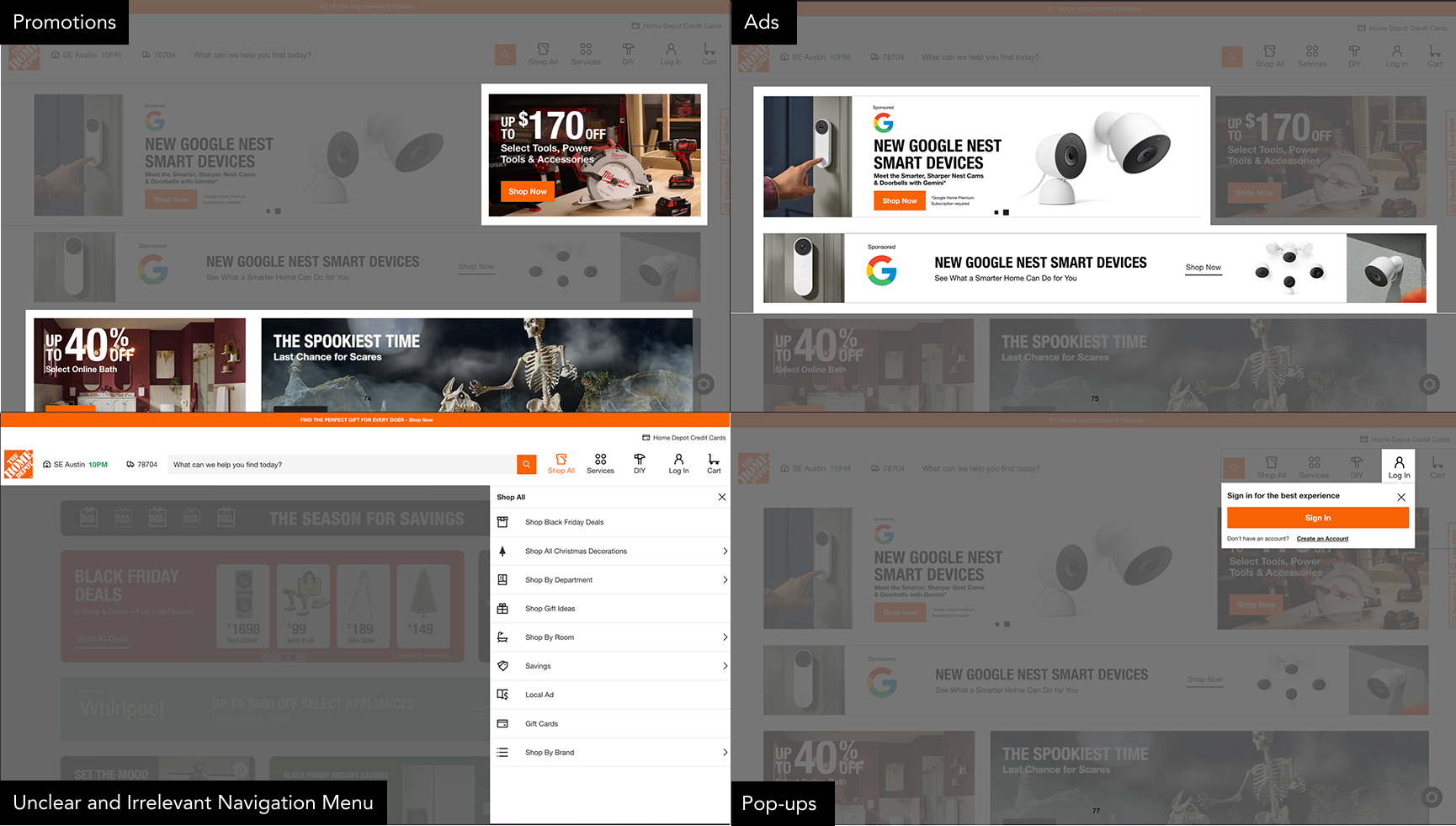
Modern webpages contain numerous elements that can distract users from their primary goals. This is the Homedepot's webpage. Say an amateur woodworker is looking to make a coffee table and they want to buy a power drill. When they visit the webpage, they see a lot of content that is not relevant to their task such as ads, promotions, and irrelevant menu options. These distractions not only slow down a sighted user who visually skim a webpage to find what is relevant to their goal, but for screen reader users, these distractions are particularly challenging as they must navigate through content sequentially, encountering each element in order. This sequential navigation can result in screen reader users taking up to twice as long as sighted users to complete the same task.
Pipeline
The system takes a webpage and a selected webpage image as selected by the user, then extracts all of the text elements on the page. It analyzes the webpage to get an image relevance score for each text element. Our score considers the distance between the text element and the target image, position of the text in comparison to the image, and the CLIP score similarity between the image and the text. For each text element, we combine these scores together to achieve the final relevance score. We use the extracted context text and its scores to inform the final context-aware description.
System
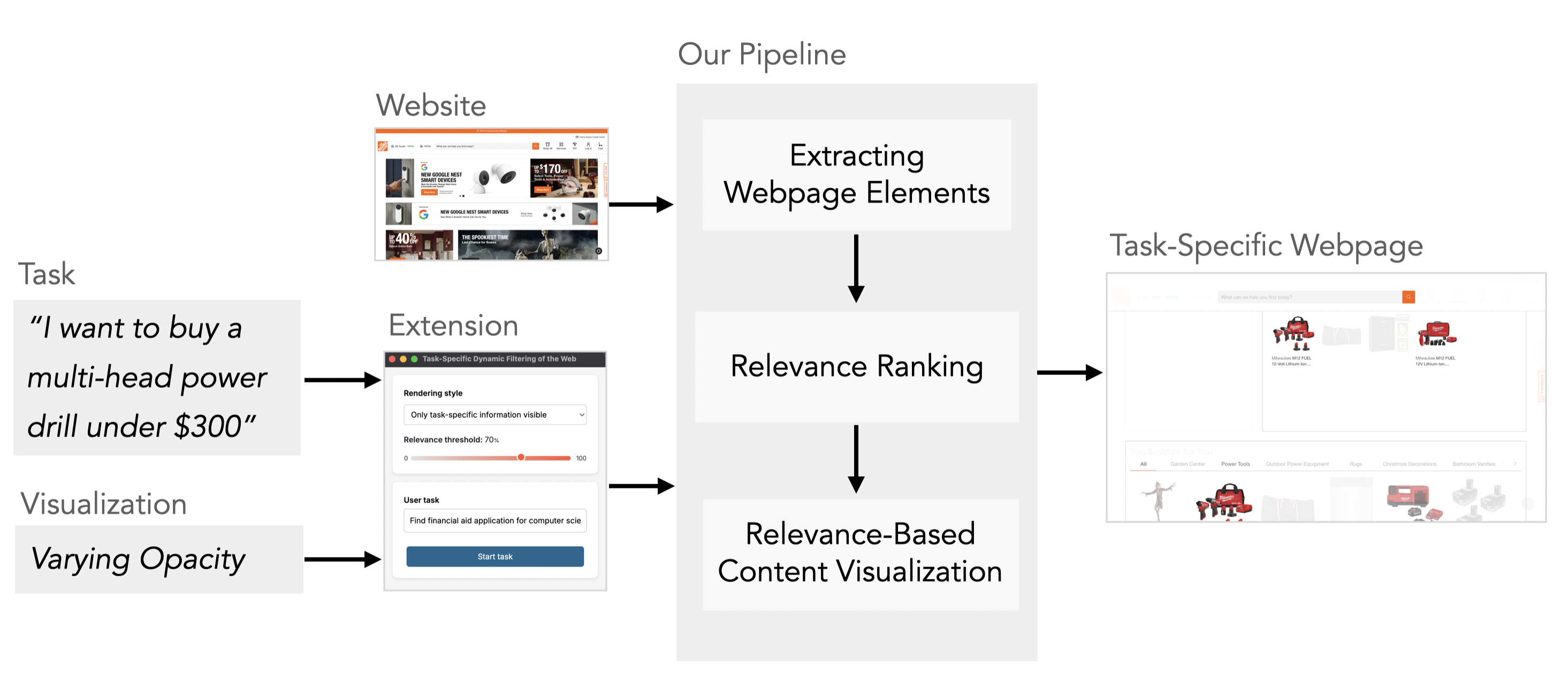
Task Mode is implemented as a browser extension that dynamically filters webpage content based on user-specified tasks. Users activate the extension and describe their goal in natural language. The system then uses large language models to analyze the page structure, identify task-relevant elements, and present different visualization modes to help users focus on what matters for their specific task.
The visualization modes allow users to toggle between viewing all content, highlighting relevant elements with dimmed distractions, or showing only task-relevant content. This flexibility lets users choose the level of filtering that best suits their needs and preferences.
For screen reader users, this makes a huge difference. When shopping for that same power drill, they can set the visualization to task-specific information only. At any time, they can adjust a relevance threshold to control how much detail they want, as they browse. Then they can add their task. Task Mode automatically processes and temporarily hides all the irrelevant content, so screen reader users can jump straight to the search bar or relevant power drill listings in far fewer strokes and time.
Results
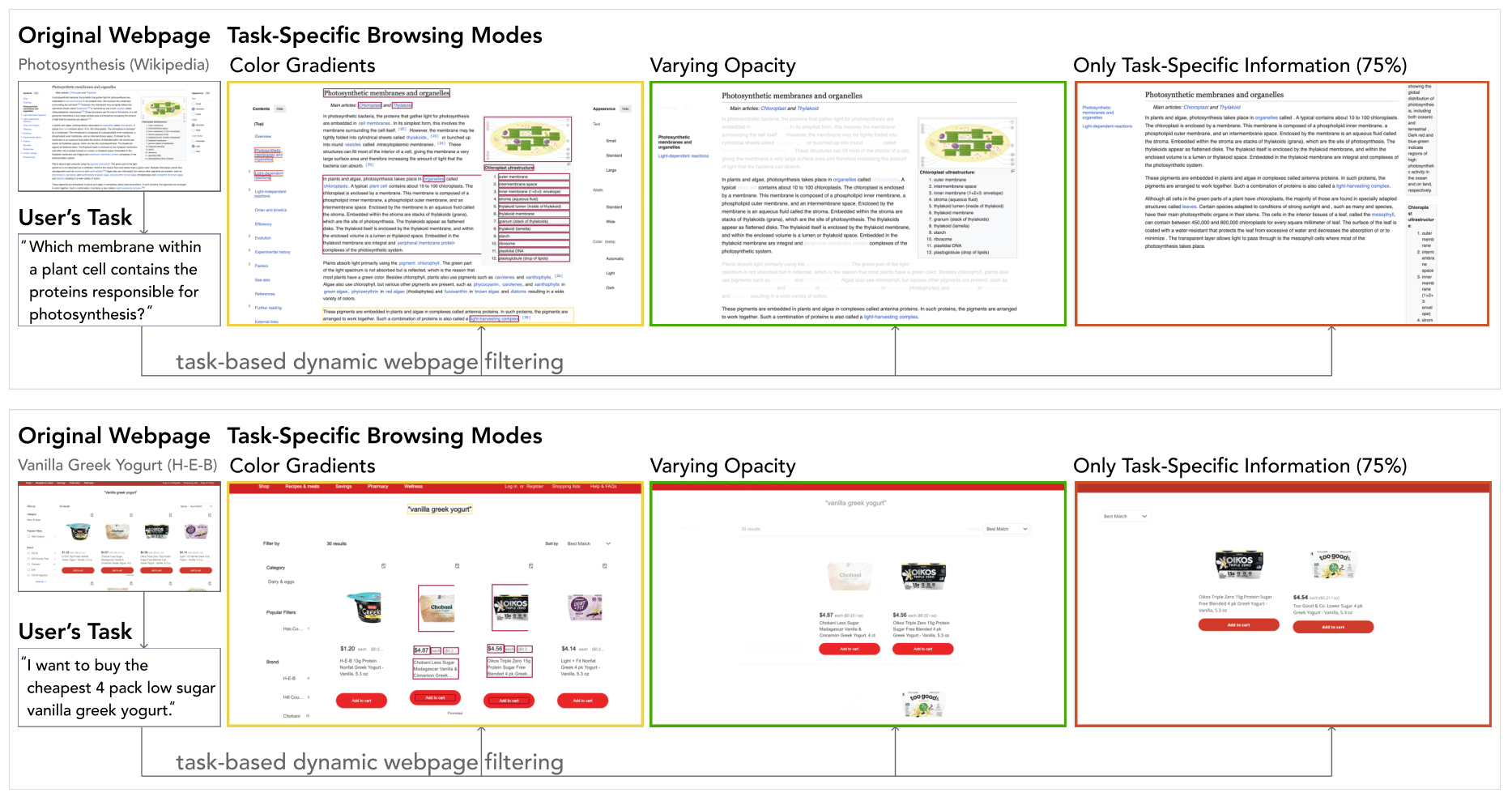
This figure shows the three rendering modes (Color Gradients, Varying Opacity, and Only Task-Specific Information - 75%) modify two types of webpages based on user tasks used in Phase 1 of the user study. In the top example (Wikipedia), the Color Gradients overlay heatmaps on web elements (texts, images, SVGs) proportional to their task relevance, while Varying Opacity fades out less relevant content, and Only Task-Specific Information (75%) threshold mode removes low-relevance sections entirely to show only the most pertinent definitions and diagrams. In the bottom example (H-E-B), the Color Gradients highlight product names, prices, and filters that best match the user's goal, Varying Opacity dims unrelated items and interface elements, and the Only Task-Specific Information (75%) threshold mode filters out all but the most relevant product listings. Each mode progressively reduces visual noise by suppressing or removing unrelated content, while retaining context to varying degrees.
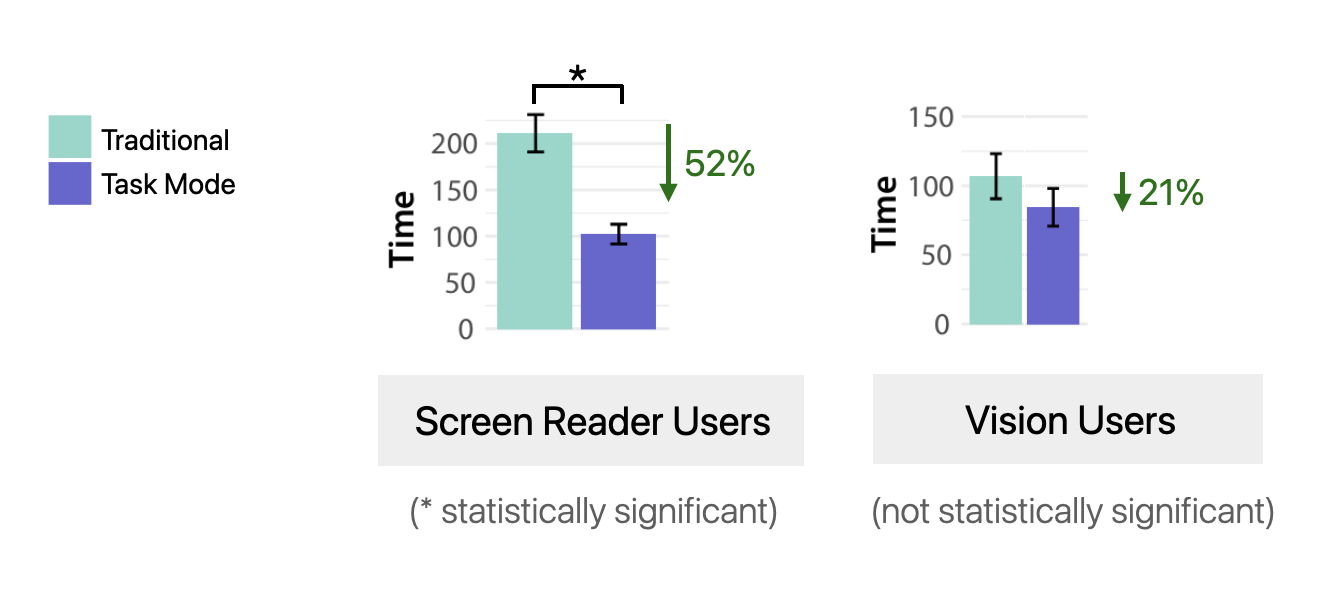
Task Mode significantly reduced task completion time for screen reader users while maintaining performance for vision users, decreasing the completion time gap between groups from 2x to 1.2x.
Original Webpage
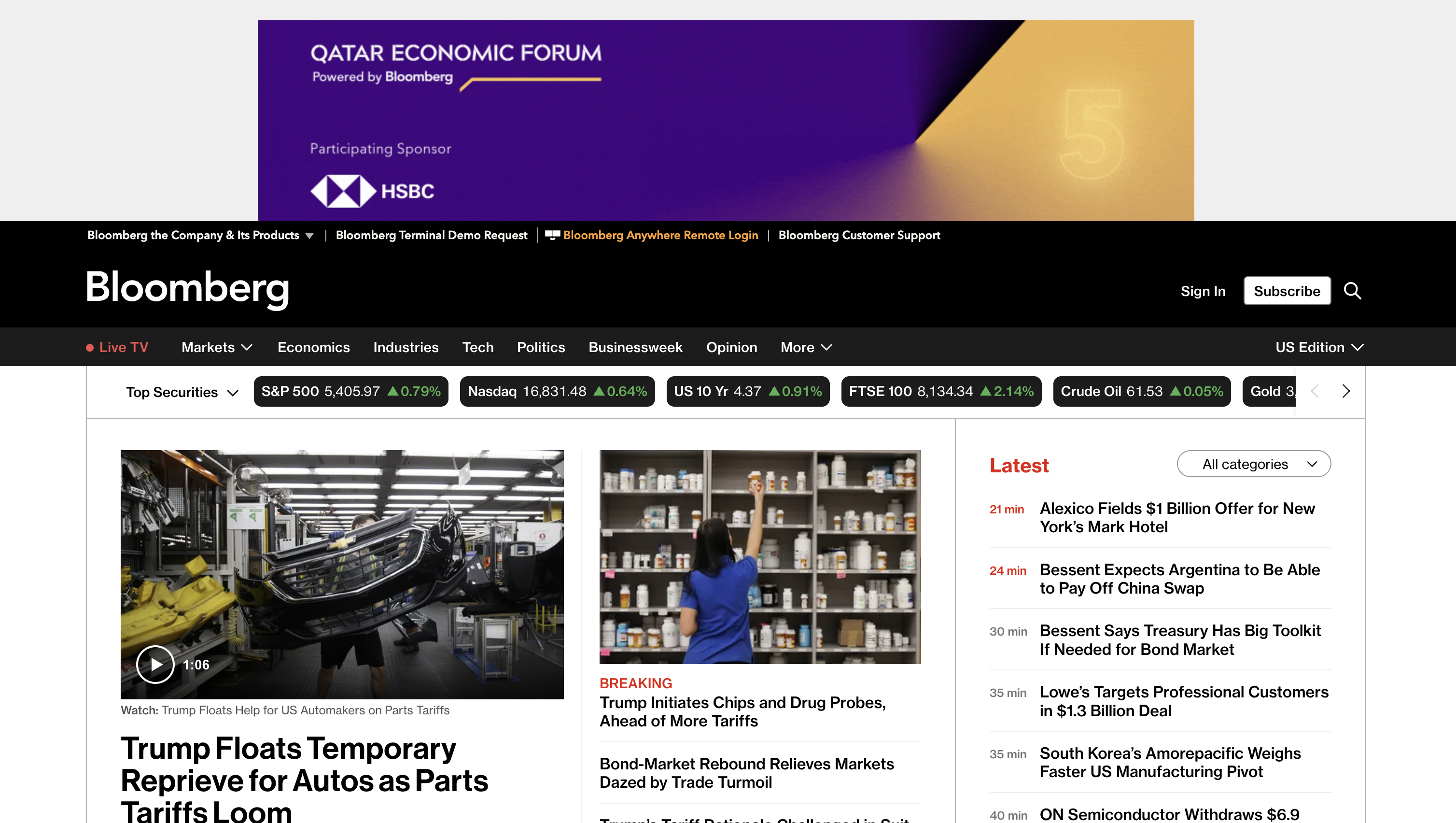
In Phase 2 where participants selected websites and tasks of their choice. Screen reader user 5 used Bloomberg website to keep up with latest news on technology. The website shows a large ad, market tickers, and multiple navigation bars before reaching tech headlines, plus unrelated content such as other news articles live-TV promos and so on - adding many landmarks, regions, and links to skip.
Task Mode
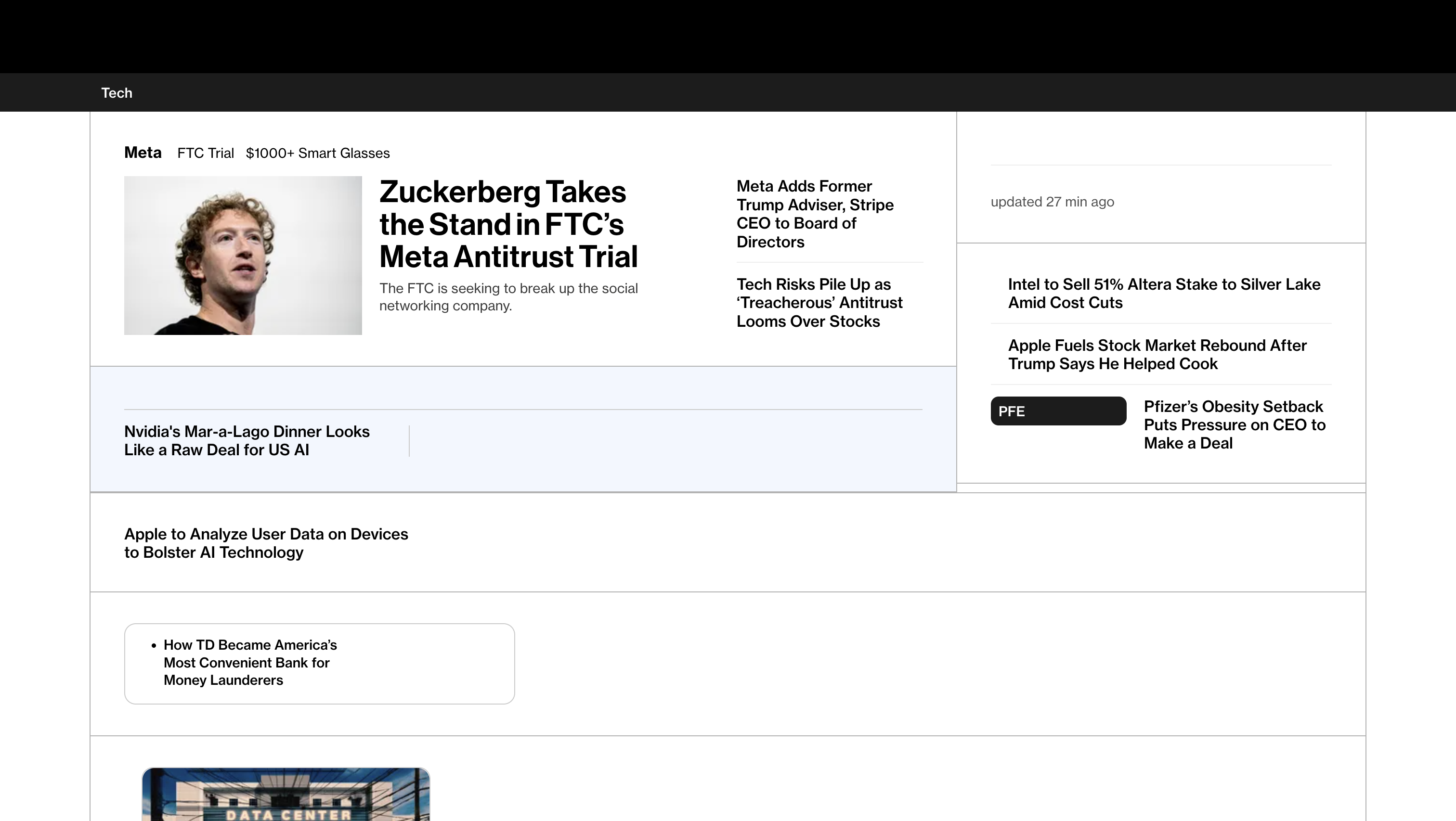
Task Mode filters the webpage around the user's task. The Tech section and headlines appeared first; all tech news on the page were retained and all unrelated links were hidden. So It took less time to find latest tech news.
BibTeX
@article{mohanbabu2025task,
  title={Task Mode: Dynamic Filtering for Task-Specific Web Navigation using LLMs},
  author={Mohanbabu, Ananya Gubbi and Sechayk, Yotam and Pavel, Amy},
  journal={arXiv preprint arXiv:2507.14769},
  year={2025}
}